
Building Your First AI Agent: Connecting RAG to n8n
Before an AI Agent can take action, it needs to 'think'. This tutorial shows how to connect a Guided Mind RAG knowledge base to n8n—the first step in building a fully autonomous agent.


In the world of automation, everyone is talking about AI Agents. But before an agent can perform complex tasks—like sending emails, booking flights, or writing code—it first needs access to information. It needs a "brain."
This tutorial is Step 1 in our journey.
We aren't building a fully autonomous robot just yet. Instead, we are building the Retrieval Flow: the core mechanism that allows your n8n workflow to "consult" your custom knowledge base before it does anything else.
The "Agent" Blueprint
We will create a simple 3-node flow that acts as the "Mind" of your agent.
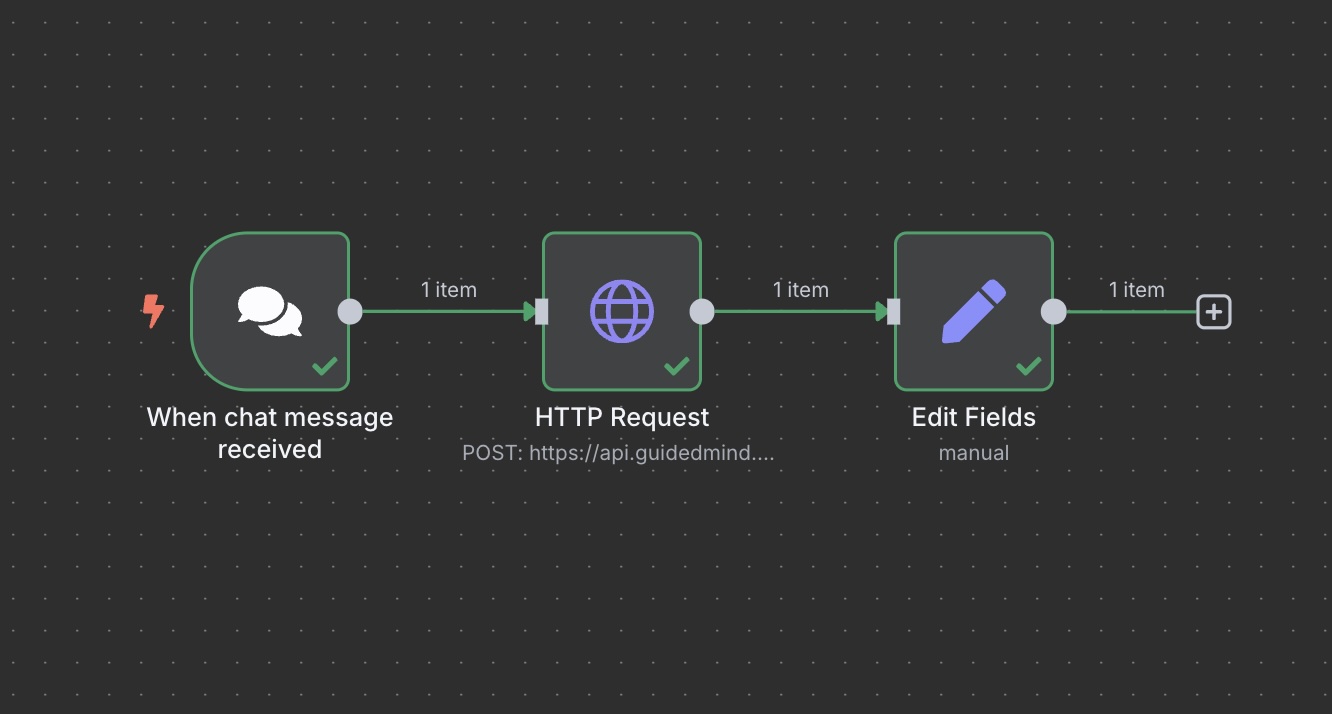
The workflow above shows the simplest possible connection: Input → Retrieval → Output.
Step-by-Step Implementation
1. The Trigger: "When chat message received"
Every agent needs a way to listen. We use the n8n Chat Trigger to simulate a user asking a question.
- Node Type:
On Chat Message - Purpose: This captures the user's intent (e.g., "What is our refund policy?").
- Setup: enable "Hosted Chat" to test it instantly in your browser.
2. The Brain: "HTTP Request" (The RAG Connection)
This is where the magic happens. Instead of relying on a generic LLM that might hallucinate, we send the query to our Guided Mind RAG engine.
- Node Type:
HTTP Request - Method:
POST - URL:
https://api.guidedmind.ai/rag/search - Auth: Header Auth (Your API Key)
- The Logic:
- The node takes the user's text from Step 1.
- It sends it to Guided Mind.
- Guided Mind searches your uploaded documents, finds the answer, and sends it back.
3. The Output: "Edit Fields"
Finally, we format the answer. In a future "Agent" scenario, this step might branch off into an email or a Slack message. For now, we simply display the answer.
- Node Type:
Edit Fields - Purpose: Clean up the API response so the chat window displays only the text answer.
Get the Workflow
Want to skip the manual setup? Download the JSON file below and import it directly into your n8n canvas.
> Note: After importing, remember to open the HTTP Request node and replace YOUR_API_KEY with your actual Guided Mind credentials.
Why Start with Simple Retrieval?
You might ask, "Is this really an AI Agent?"
Technically, this is Retrieval. But consider this: An agent that takes actions without knowing your business rules is dangerous. By mastering this connection first, you ensure that every future agent you build—whether it's for customer support or internal ops—is grounded in your actual data.
Next Steps: Now that your n8n flow can "read" your manual, the next tutorial will explore how to make it "act"—like drafting a reply or updating a CRM based on what it found.
Ready to build the brain? Get your API key from the Guided Mind dashboard.